

FAQs
How do I register as a Sponsor?
Our online registration is closed. To be a sponsor, please contact us at FOT@bcchf.ca
On the Festival of Trees Homepage, select the location where your tree will be located – Mission Hill Winery, Delta Grand Okanagan, SEAPARC Recreation Centre, or Whistler. Alternatively, select the “Sponsor a Tree” button at the top of the page. Pay the sponsor registration fee associated with your sponsorship level and you will be directed to create a new fundraising page.
*Please note: The Bay Centre in Victoria will have it’s own sponsor registration system and you can register online here: Festival of Trees | Bay Centre Shopping Centre or contact festivaloftreesvic@gmail.com.
How do I start fundraising?
Start by logging into your personal fundraising page here, or by clicking the link in your confirmation email. You can personalize the page by uploading your photo, and sharing why you’re fundraising for BC Children’s Hospital through the Festival of Trees. After your page is set up, share it on your social media channels and spread the word to family, friends, and supporters.
What is my fundraising page?
It’s the place where friends, family, clients and supporters can donate to you online. It’s up to you to personalize it by adding images and messages to show everyone why you’re participating, and why they should support you. Contact us at fot@bcchf.ca if you need help accessing your fundraising page.
How can people find my fundraising page?
After you register or log into your personal fundraising page, you’ll see your personal fundraising page link at the top of your dashboard. You can copy that link and send it to your supporters.
Friends or family can also visit the Festival of Trees homepage and select the “Support a Fundraiser” button. They can then search for your company or team name and find your personal or team fundraising page.
How do I submit offline donations?
You can enter offline donations from your friends and family right in your own dashboard.
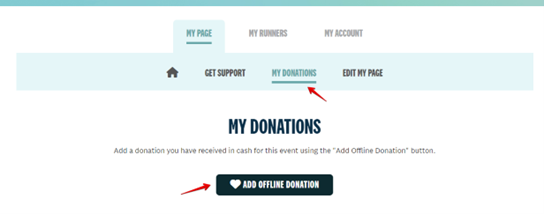
You will input donor details for each donation you have received offline and make the donation via your own credit card and keep the cash.
My account says “Not yet active”. What does this mean?
When you sign up as a sponsor, you will receive a registration confirmation email that requires you to confirm your company or team details in order to activate your account. The email will have the subject line "You’ve been registered for Festival of Trees". Please check your email (both inbox and spam folder) for this invitation and click the link to complete your account.
Can I send emails and messages through my fundraising dashboard?
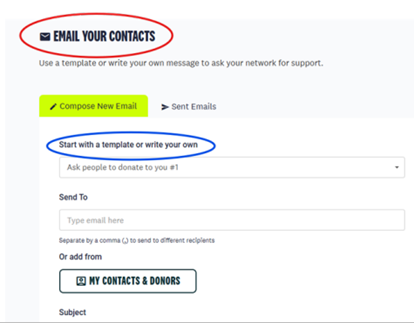
Yes! We encourage you to send emails to your donors and messages to your team members. You can also use this feature to share your fundraising page, recruit new runners, and boost your overall fundraising.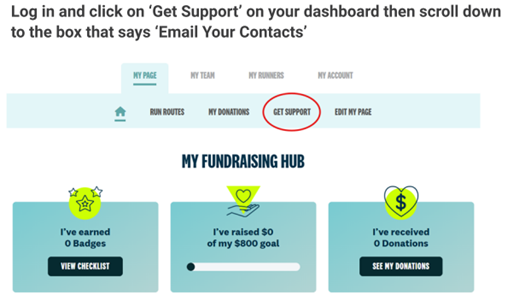
What do I do if I forget my password?
If you can’t remember your details after registration, you can select “LOGIN” at the top right corner of our navigation bar. This will open the login popup where it will ask for your email address and password. Simply click “Forgot password” and follow the prompts to reset your password. If you have any questions or need assistance to reset your password, please email us at fot@bcchf.ca and we can assist you.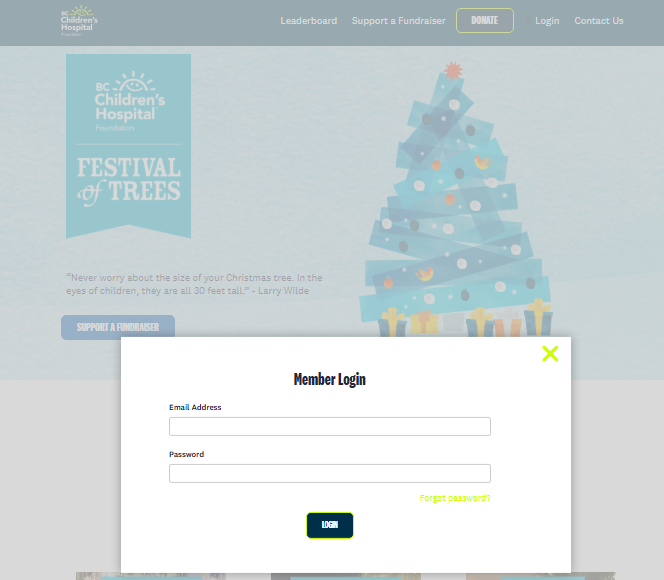
Do all donors get a charitable tax receipt?
- Online donations:All donors will receive a charitable tax receipt within minutes of their donation.
- Cash or cheque pledges with email addresses:All donations of $20 or more with a valid email address will be sent a charitable tax receipt via email after the event.
- Cash or cheque pledges without email:Cash or cheque donations of $20 or more with a valid legible donor name and mailing address will be sent a charitable tax receipt through the mail after the event.
**Please note: Sponsorship fees are not eligible for tax receipts.
How can I see how much my company / team has raised?
Visit your personalized fundraising page and view the amount listed under “My Goal”.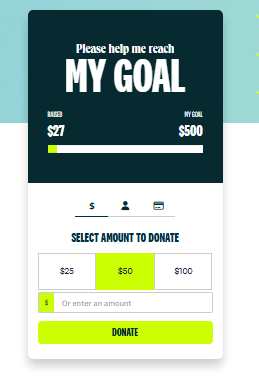
What if I have other questions about Festival of Trees?
Please email us at fot@bcchf.ca and we will do our best to assist you.


